
Deploy on Railway
Railway is the easiest way to get My Own Suite running today.
This option is best for people who want the fastest path to a working setup without managing their own server first.
Railway is simply one place where your private My Own Suite cloud can run.
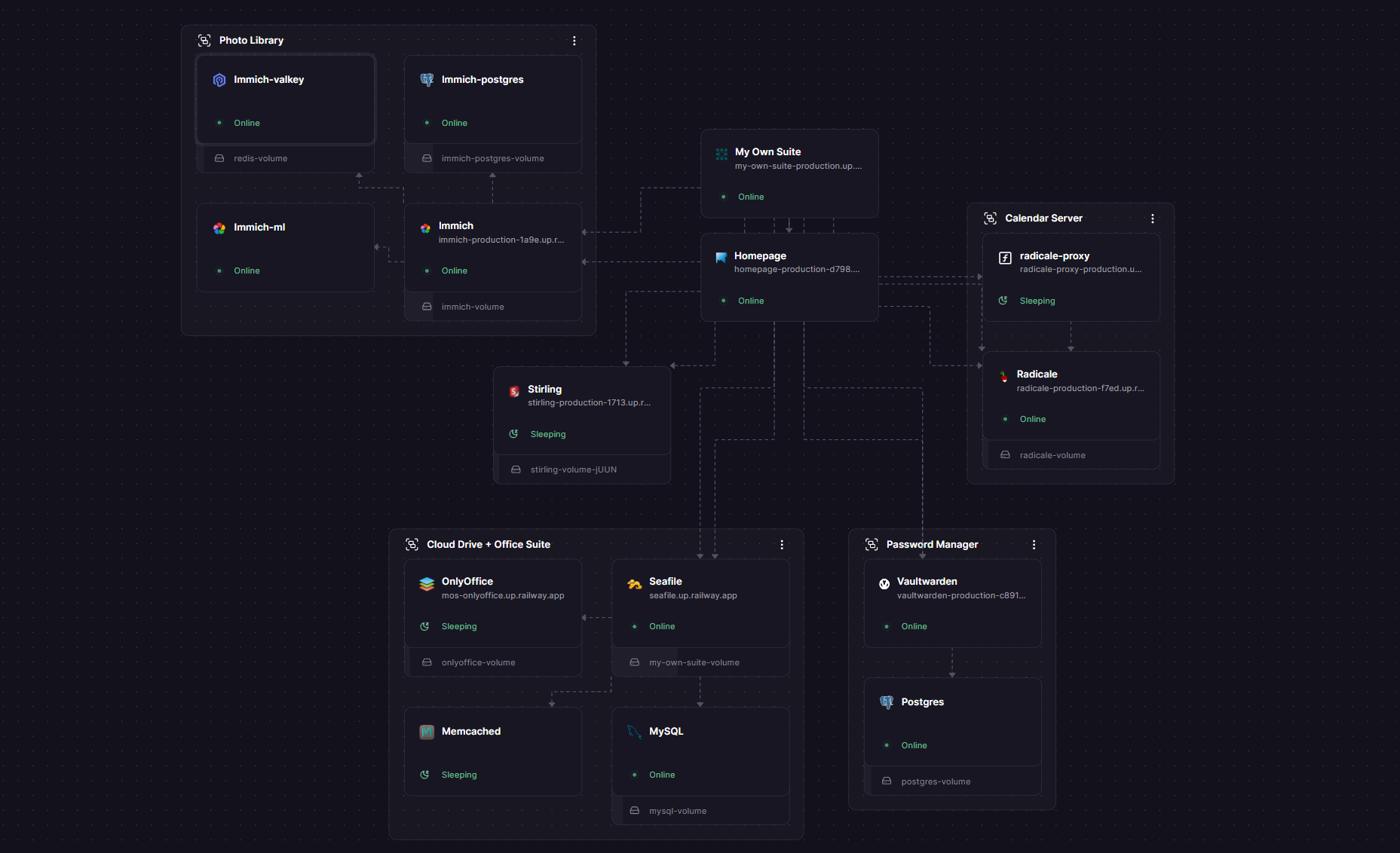
Before you start
Section titled “Before you start”You will need:
- A Railway account
- A Railway Hobby plan or higher
It is recommended to sign up with GitHub. That becomes especially helpful later if you want to customize or manage the deployment more directly.
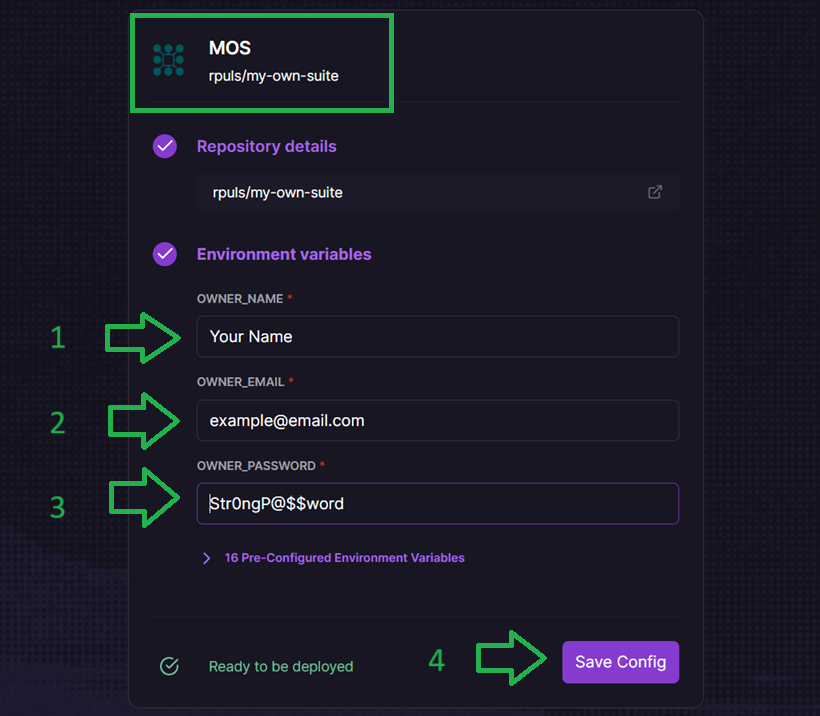
What you need to fill in
Section titled “What you need to fill in”During the deploy flow, find the My Own Suite service and set these values:
OWNER_NAMEOWNER_EMAILOWNER_PASSWORD
Tips:
OWNER_EMAILis your own login email for the suite setup flow and is not shared with anyone.- Use a strong
OWNER_PASSWORD. - Keep these details somewhere safe, because you will use them right after deployment.
Optional advanced email setup
Section titled “Optional advanced email setup”Railway users who already understand SMTP can optionally fill in the SMTP values on the MOS service to unlock email-backed features in compatible apps such as Seafile and Vaultwarden.
This is fully optional. My Own Suite does not require SMTP just to run.
In practice, this is only useful for people who already have access to a working mail provider and know how to match host, port, security mode, username, password, and sender settings correctly.
The full technical setup belongs in the dedicated SMTP guide:
Start the deploy
Section titled “Start the deploy”Click the button below to start the Railway setup.
The rest of this page walks through each step, so if anything feels unfamiliar you can keep reading and follow along as you go.

Deploy
Section titled “Deploy”- Click the Railway button above.
- Create or sign in to your Railway account.
- Choose the template and continue the setup flow.
- Scroll to the
MOSservice and click theConfigurebutton. - Fill in your owner name, owner email, and a strong owner password.
- Start the deployment.
The full deployment usually takes about 3 to 10 minutes.
Open your suite
Section titled “Open your suite”After the deployment finishes:
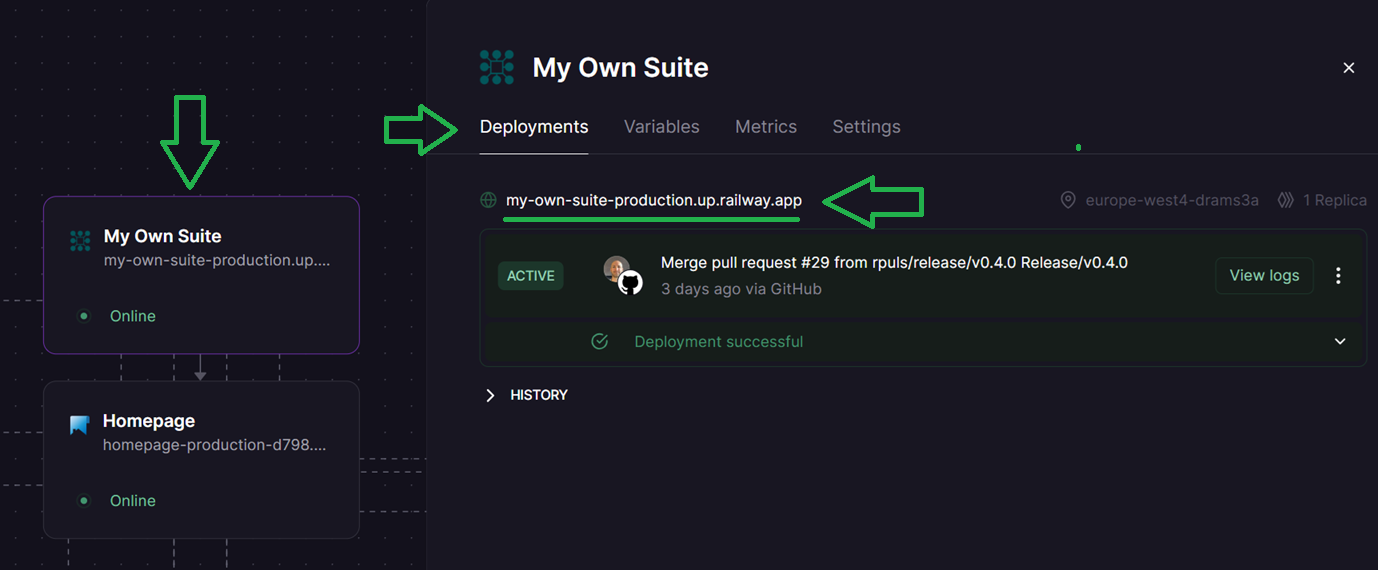
- Open the
MOSservice in Railway. - Open the
Deploymentstab. - Click the generated public URL.
- Sign in with the owner email and owner password you just set.
From there, you will enter the normal My Own Suite onboarding flow.
What about resource use and cost?
Section titled “What about resource use and cost?”Running a full private cloud suite does cost something, because several services are running together instead of one single app.
The good news is that the Railway template starts with simple default per-service limits of up to 8 vCPU and 8 GB RAM, and those limits are more generous than most of the included services actually need.
That means many people can safely lower the limits on lighter services to keep monthly cost down.
What to keep in mind:
ONLYOFFICE,Immich, andImmich Machine Learningbenefit from having real resource headroom.- Many of the other services can run comfortably with much lower limits.
- Railway also offers a serverless sleep model, so if you want to cut cost further, some services can sleep when they are not being used.
The screenshot below shows one real example estimate of around $36 per month, but that is not a fixed requirement for every deployment.
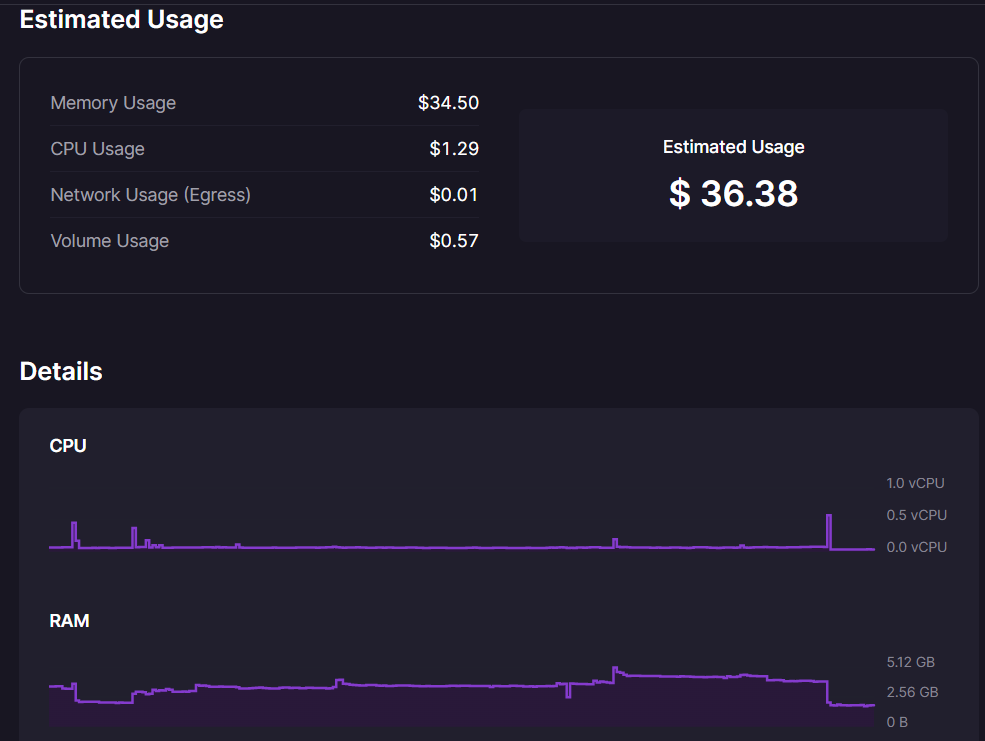
Proper My Own Suite resource tuning guidance for Railway is coming in a future update.
What happens next
Section titled “What happens next”After sign-in, Suite Manager becomes your guided first-run entrypoint.
You will use it to:
- confirm access to the suite
- move through the onboarding flow
- reach Homepage, which becomes your main dashboard afterward
Who should choose this?
Section titled “Who should choose this?”Railway is the best fit if:
- you want the easiest setup
- you are mainly evaluating the project
- you do not want to manage a server yourself yet
Why this is still very different from Google, Microsoft, or Apple
Section titled “Why this is still very different from Google, Microsoft, or Apple”Choosing Railway means your suite runs on infrastructure operated by a hosting company, but that is still very different from using a consumer platform whose business is built around owning the app layer, controlling the ecosystem, and monetizing user behavior.
With My Own Suite on Railway:
- the apps are open source and run in your own deployed stack
- your files, passwords, photos, and other suite data stay inside your deployment rather than inside a Big Tech consumer product
- Railway is the infrastructure provider, not the owner of your personal suite experience
- you can move later to a VPS or your own hardware if you want more independence
- you are not using an ad-supported consumer ecosystem designed to profile usage across products
What I would say confidently:
- you still control your own deployed stack
- you retain a much clearer ownership boundary around your data than you do with Google Workspace, Microsoft 365, or Apple’s cloud ecosystem
- Railway is a hosting layer, not the app vendor for the suite itself
Railway privacy and compliance
Section titled “Railway privacy and compliance”If you want to review Railway’s own privacy, security, and compliance materials directly, start here:
As of March 17, 2026, Railway’s compliance documentation says Railway provides a DPA for GDPR-related processor relationships, publishes security and compliance material in its Trust Center, and states that team members will not modify an application without expressed permission. I think the safest way to describe Railway is as a hosting provider with a processor-style relationship, not as a consumer data platform.
If you later want more hosting freedom, you can move on to Deploy on a VPS.