
Homepage
Homepage is your start screen for My Own Suite. It brings your apps together in one place, so you can quickly jump between them and keep your setup feeling cohesive.
After signing in and completing setup in Suite Manager, Homepage becomes the natural entry point for your day-to-day use.
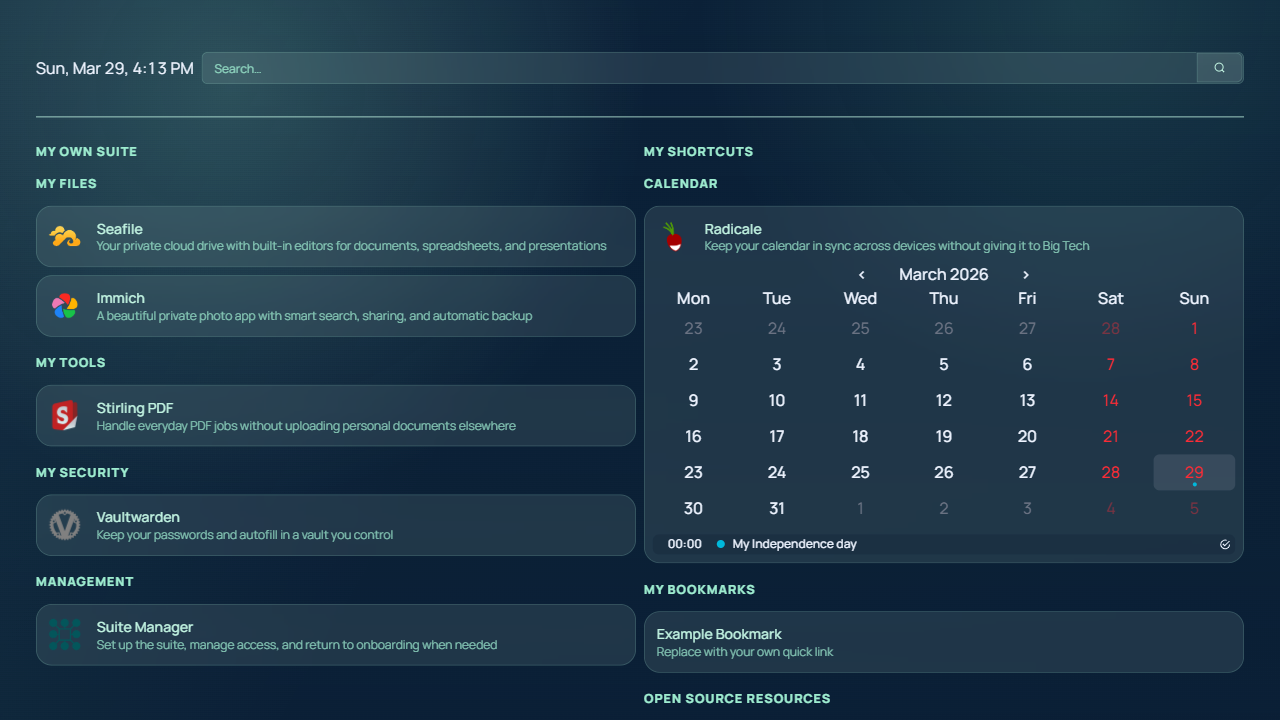
The built-in search bar uses Startpage, a privacy-focused search engine. It is included as a better default for people who want useful search without turning every query into tracked behavior.
Startpage is designed to avoid storing personal search history or building user profiles, while still returning relevant results. In practice, that means the search box on your dashboard stays useful without becoming another place that tracks what you look up.
The dashboard is generated from your current stack configuration:
- If an app is active and has a valid URL, its tile appears
- If an app URL is missing or the app is disabled, that tile is excluded
- After rebuilding or restarting Homepage, visible tiles align with your actual stack
Homepage is optional. If you prefer, you can bookmark individual apps and access them directly. The goal is simply to give you a convenient place to bring everything together.
Technical reference
Section titled “Technical reference”Environment variables
HOMEPAGE_ALLOWED_HOSTS: Allowed hostnames for Homepage (hostname1,hostname2,...).SUITE_MANAGER_URL: Public Suite Manager base URL used for the Suite Manager resource tile, which appends/setup/.- Any
${VAR_NAME}used inconfig/services.template.yaml:- Example:
${SEAFILE_URL},${VAULTWARDEN_URL},${ONLYOFFICE_URL}. - If not set (or empty), dependent tile is excluded from final dashboard.
- Example:
Customizations in this project
- Homepage config is generated at container start from a template.
entrypoint.shrunsnode /app/config-generator/dist/index.js /app/configbefore starting Homepage.- Suite Manager is the public login and setup surface for the stack; after sign-in it proxies Homepage instead of Homepage implementing its own login UI.
- Source template:
config/services.template.yaml - Generated output:
config/services.yaml - Generator behavior:
- Replaces
${ENV_VAR}placeholders using runtime environment values. - If any placeholder in a service is unresolved, that full service is removed.
- If a category has no remaining services, that category is removed.
- Replaces
- Result: tiles appear only when their required env values exist.
Files commonly edited for customization:
apps/homepage/config/services.template.yaml: categories, tile order, names, descriptions, and icons.apps/homepage/config/widgets.yaml: widgets.apps/homepage/config/bookmarks.yaml: bookmarks.apps/homepage/config/settings.yaml: general dashboard settings.apps/homepage/config/custom.css: visual overrides layered on top of Homepage defaults.apps/homepage/config/custom.js: client-side theme bootstrapping that keeps Homepage on the bundledtheme-mospalette unless a different theme is explicitly active.
Current defaults in this repo:
settings.yamlkeeps Homepage’s built-in theme and palette switchers available, whilecustom.jskeeps fallback/default clients on the bundledtheme-mospalette.custom.cssgives Homepage the same MOS brand feel used elsewhere in the suite, including the lighter clean-header treatment and softer card styling.widgets.yamlkeeps the top bar intentionally simple with datetime and Startpage-powered search.- The Suite Manager resource opens the control-plane
/setup/route directly so users can return to onboarding later without guessing the URL.
Tile template example:
- Storage: - Seafile: href: ${SEAFILE_URL} description: Self-hosted file sync and share icon: mdi-folder-syncOperational commands
- If you changed
services.template.yamlor other files underapps/homepage/config:- Rebuild Homepage image (from repo root):
npm run vps:rebuild
- Rebuild Homepage image (from repo root):
- If you changed only env values in
deploy/vps/apps/homepage/.env:- Restarting Homepage is enough.
Troubleshooting
- Check generated config inside container:
docker compose -f deploy/vps/docker-compose.yml --project-directory deploy/vps exec homepage sh -c "cat /app/config/services.yaml"
- Check generator logs:
docker compose -f deploy/vps/docker-compose.yml --project-directory deploy/vps logs homepage --tail 200
- Common issue:
- Missing env var removes tile silently by design.